
Skills: Best Practices
When to Create a Skill
The Two-Times Rule: if a workflow is useful once, keep the output. If it's useful twice, turn it into a Skill.
Good signals include a process that took real tuning to get right, a multi-step workflow that would be annoying to recreate manually, a format you'll reuse often, or a method you want teammates to follow consistently. The agent may also offer to save a Skill on its own, either when you repeat the same workflow twice in a session, or right after a "cracked recipe" (a result that took real trial and error to land). You can always ask it to save one yourself instead.
Anatomy of a Great Skill
A good Skill balances consistency (what stays fixed) with flexibility (what changes per run). For example, a material reskin Skill might always preserve object shape and camera angle while letting the material change every time.
At minimum, a Skill needs a title, a description (so the agent knows when to use it), and step-by-step instructions. Strong Skills also define required inputs, model or tool choices, what should stay consistent versus what can change, and how to handle failures. The description matters most, since it's what the agent matches future requests against, so use concrete, specific language.
Create a Skill in the Luma app
There are several ways to create Skills in Luma. Below is a quick breakdown on how to build, import, and manually create a Skill in Luma;
1. Access the Skills menu by clicking the puzzle piece at the bottom right corner of your chat window.
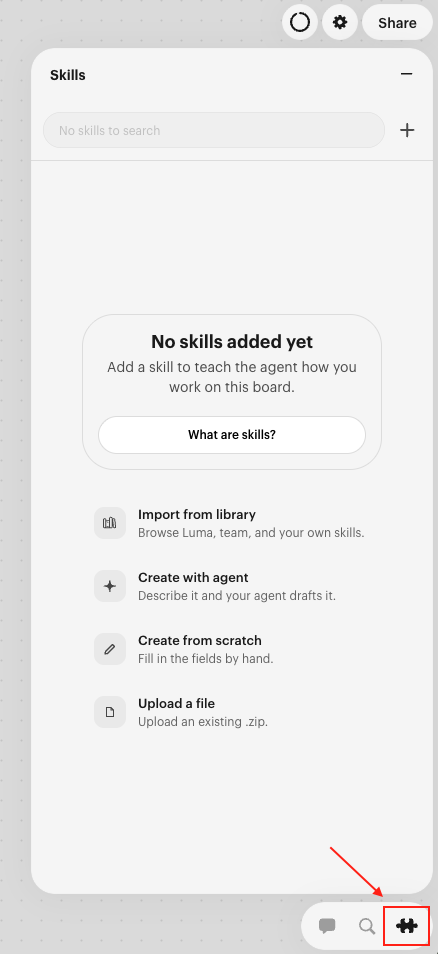
From this menu, you have 4 ways to create, import, and or upload a Skill into your canvas.
Import a Skill from our existing library of Skills
Collaborate with the agent to build your desired Skill together
Create a Skill from scratch by filling out our Skills template
Upload your existing Skills by selecting the Upload a file option
Additional ways to create a Skill
From chat: "Create a Skill that repaints any object in a matte color."
From a finished output: select an image or video you love and say "Turn this into a Skill." Luma can reconstruct the workflow from the asset's model, prompt, and settings.
From a board process: select the relevant assets and steps and say "Distill this into a Skill."
Right after a win: "Save this as a Skill," while the setup is still fresh.
By copying: built-in and shared Skills are read-only. Ask the agent to copy the Skill into your Skills, give the copy a meaningful name, and then describe the changes you want. The copy includes the Skill's instructions, references, assets, and required Skill dependencies, so you do not need to download and re-upload a .zip.
Example: "Copy this Skill as vertical-product-storyboard, then change the output to 9:16."
From brand assets: upload packshots, logos, or guidelines to anchor a Skill to your real visual identity.
When drafting a Skill, the agent asks "locking questions" to separate what should stay fixed from what should change per run (for example, should the subject's identity always be preserved, or set by the user each time?). Answer thoroughly; the agent will propose defaults you can adjust.
Publish a Skill for reuse
When other people need the workflow, share it as a published package. Give the package a clear name and a short description that says what it is for. If the Skill depends on other Skills, review and include the required dependencies when prompted.
Choose the installation scope separately from sharing. A recipient can install a package for themselves, for a team, or on a specific board. Publishing makes a package available to share; installing determines where the agent can use it.
After changing a Skill that has already been shared, update the existing package instead of publishing a duplicate. The share link stays the same, and installed copies can be updated to the latest version.
Test Before Saving
An untested Skill is just a hypothesis. Run a test on your own assets before approving it, and give direct feedback if it's off, such as "edit this Skill so the pose stays identical" or "make sure it only uses this model for final outputs." Keep iterating until the result is predictable, not just correct once.
Once it's saved, if the agent doesn't load it on a fresh request, sharpen the description. If it loads but the output drifts, refine the relevant step (see the FAQ for common fixes).